Great models start with great data. A training data pipeline is the engine that turns messy inputs into clean, valuable datasets your models can trust. When this engine is well designed, experiments move faster, model quality improves, and production issues shrink.
This guide walks through every stage. You will plan with a clear objective, choose the right sources, collect responsibly, validate early, label with intent, and monitor the pipeline once it is running. You will also see where Grepsr fits when you want to scale acquisition, guarantees, and delivery without spreading your team too thin.
What is a training data pipeline?
A training data pipeline is a step-by-step flow that prepares data for model training. Think of it as a factory line. Raw material comes in. Quality checks happen at several stations. Material is cleaned, shaped, and labeled. Batches are packed, stored, and then sent wherever training jobs need them. After shipping, you watch the line for delays, defects, and drifts so the next batch is better than the last.
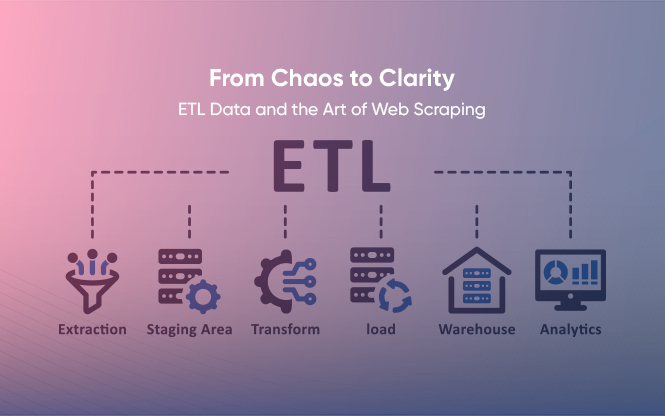
Typical steps are: ingest, validate, transform, label, split, store, serve, and monitor. The exact design depends on your task, your sources, and the risks you need to manage.
Principles that keep pipelines healthy
Start with the schema. Write down what a “good” record looks like. Name each field, its type, allowed values, and the rules it must follow. The schema becomes the contract for every stage in the pipeline.
Track provenance. Keep the source, capture time, and any processing notes. If questions appear later, you can trace an output back to the inputs that created it.
Version everything. Datasets change over time. So do spiders, ETL jobs, and labeling rules. Versioning makes experiments repeatable and audits straightforward.
Collect only what you need. Extra fields seem harmless, but they raise costs and privacy risks. Small and sharp beats big and fuzzy.
Respect compliance and site terms. When scraping, follow the robots’ guidelines and the site’s terms of use. If personal data appears, apply data minimization, purpose limitation, and access controls. Build opt-out and deletion paths into your process.
A step-by-step blueprint
1) Define the objective and success measures
State the task in one sentence and list the signals you need. Tie it to simple success measures. Examples:
- Classify product reviews by sentiment and topic using review text, rating, category, brand, and time.
- Forecast weekly median rental prices using listing attributes, locations, and capture dates.
Add success measures such as coverage, duplicate ceiling, null ceilings, and freshness windows. These targets will guide every decision that follows.
2) Design the schema and a short datasheet
Turn the objective into an explicit schema. For every field, define the type, allowed values, basic ranges, and whether it is required. Right after that, draft a one-page datasheet that explains the dataset’s purpose, sources, licenses, intended use, known gaps, and any ethical notes. This helps teams use the data correctly and prevents misuse.
3) Choose sources that match the task
Select sources that actually contain the signals your model needs.
Public datasets help you bootstrap. Domain websites and portals provide fresh, granular signals. Internal systems carry valuable labels and outcomes. Prefer diverse sources that reduce bias. For web collection, confirm that access is allowed and that you can meet rate limits and terms. Always record where each record came from and when you captured it.
Where Grepsr helps: If you need extensive, reliable web data, Grepsr provides managed acquisition that respects site terms and your schema. You get scheduling, IP rotation, change detection, and delivery to your data lake or warehouse. See Grepsr Services and Customer Stories. For a deeper dive into quality controls, read How to Ensure Web Scraping Data Quality.
4) Ingest with protection at the edge
Move quality checks as close to the source as possible. It is cheaper to catch issues early.
Check required fields and basic types. Canonicalize keys and detect duplicates before storage. Enforce simple ranges such as favorable prices or valid categories. Keep capture logs so you can replay or repair bad runs.
Design for failure with retries, backoff, alerting for long delays, and sensible limits so one bad source does not block the whole run.
5) Transform with clarity
Transformations should be predictable and well-documented.
Normalize units, dates, currencies, phone numbers, and locations. Clean text and keep only meaningful content. Resolve entities where the same item appears under slightly different names. Add derived fields that help learning, but avoid piling on features that do not connect to your task.
For numeric fields, decide how to handle outliers. For text, decide what you will strip, what you will keep, and how you will treat special characters.
6) Treat labeling as a pipeline, not a one-off task
Labeling is not just clicking boxes. It is a process you can measure and improve.
Write short guidelines with examples and edge cases. Start with simple rules or patterns to create draft labels where safe, then audit a stratified sample and track agreement rates between annotators. Keep a small adjudication loop for complex cases and feed decisions back into the guidelines.
If the task changes over time, plan for periodic relabeling or active learning to refresh labels where the model is most uncertain.
7) Split for realistic evaluation
How you split data affects the story your metrics tell. Use time-aware splits for time-sensitive problems so your test set represents the most recent period. For grouping problems, keep all items from the same group together to avoid leakage. Store the split definitions with your dataset so training runs can reproduce them.
8) Store, version, and deliver with lineage
Store each batch in a structured layout. Keep snapshots and a short manifest listing fields, row counts, checksums, and the schema version. Attach the datasheet and any policy notes. Expose the data to training jobs through a stable and straightforward interface so your platform team can evolve storage without breaking researchers.
9) Monitor and operate like a product
Pipelines are living systems. They need attention.
Track drift and skew by comparing current batch statistics with a baseline. Watch freshness and volume by source and by field. Keep a readiness checklist that covers data tests, model tests, and infrastructure checks. A simple score view tells you when it is safe to deploy.
Write short runbooks for common incidents, such as a blocked source, a sudden duplicate spike, or an upstream schema change.
Security, privacy, and governance
Security and privacy sit inside the pipeline.
Apply data minimization. Detect and protect personal data. Mask or tokenize sensitive fields. Encrypt in transit and at rest. Use access controls tied to roles and projects. Keep audit logs for data views and exports. Set retention rules. Build user rights workflows where required. Review vendor risk if any step uses a third party.
Worked example 1: Forecast house prices with web data
Goal. Predict weekly median house prices for five major cities.
Fields. Listing ID, source URL, capture time, city, locality, geo coordinates, property type, bedrooms, bathrooms, built area, lot area, price, currency, year built, amenities, and notes.
Source approach. Use public listing portals that allow automated access. Sample across cities and property types. Track changes to the duplicate listing over time to study price movement.
Edge checks. Enforce required fields, valid coordinates, favorable prices, and the allowed currency list. Dedupe by a composite key such as source plus canonical URL.
Transformations. Normalize currencies, standardize area units, and clean text descriptions to keep proper signals like “near metro” or “new construction.”
Labeling. Use simple rules to tag “new build,” “renovation needed,” and “near transit,” then audit a sample per city each week.
Splits. Keep the latest week as a test set and use a rolling origin setup so the evaluation matches the deployment.
Monitoring. Track drift in price distribution versus a four-week baseline and alert on sharp volume drops.
Delivery. Provide daily snapshots with a manifest and a link to the datasheet. Training jobs read the latest approved snapshot.
Worked example 2: Personalize an e-commerce homepage
Goal. Show each visitor a relevant set of products at page load.
Signals. Clickstream events, product catalog, inventory, price, and user segments.
Flow. Stream events into a landing zone. Pull catalog updates from the product system of record. Join signals through stable product IDs and session IDs.
Quality gates. Null rate on key IDs near zero. Event timestamps in the window. Product status active. Prices are positive and in sensible ranges.
Transformations. Standardize category taxonomies. Flatten nested attributes. Add features such as time since last view, price band, and season tags.
Labeling. Derive labels from historical clicks and purchases with a short lookback, excluding the most recent period to prevent leakage.
Monitoring. Watch event volume by channel, conversion rates, and product attribute drift. Keep a safety switch to revert to a popular baseline.
Cost and performance tips
Sample smarter for early experiments—cache expensive steps. Push dedupe and basic ranges near the source. Track unit costs, such as “cost per thousand rows.” Spikes usually reveal a fragile source or format change.
How Grepsr fits
Grepsr helps you ship reliable pipelines without building every bolt yourself.
- Acquisition at scale. Managed web collection that respects site terms and your schema.
- Quality built in. Dedupe, anomaly flags, and run failure when thresholds break.
- Versioned delivery. Snapshots to lakes, warehouses, or APIs with lineage and capture logs.
- Partnership. Solution engineers who design sampling, validation, and drift checks that match your ML tasks.
Checklists you can keep
Design
One-sentence objective. Success measures for coverage, duplicates, nulls, and freshness. Schema and datasheet drafted. Sources chosen with permissions confirmed.
Quality gates
Required fields and types are enforced near the source. Duplicate detection and canonicalization. Simple ranges per field—baseline statistics captured for drift checks.
Monitoring
Drift and skew alerts. Freshness and volume alerts per source. Readiness score across data, model, and infrastructure. Short runbooks for common incidents.
Frequently Asked Questions
1. What is a training data pipeline?
It is the workflow that ingests, validates, transforms, labels, splits, stores, and serves data for model training. Monitoring keeps the workflow healthy over time.
2. Why does schema-first planning matter?
It creates a shared contract for engineers, analysts, and labelers. When everyone uses the same rules, quality improves and rework drops.
3. How do I detect data drift?
Keep baseline statistics for key fields and compare each new batch against them. Alert when differences exceed a threshold.
4. How can I reduce labeling cost without losing quality?
Start with simple rules to create draft labels, then audit a sample and refine guidelines. Keep a small adjudication loop for complex cases.
5. What is the best way to split data for time-sensitive tasks?
Use time-aware splits. Keep the most recent period for testing so results mirror production.
6. How do I make pipelines reproducible?
Version datasets, configurations, and processing steps. Keep provenance and a short manifest for each snapshot.